78.3 SUBTITLE STL: IMPORT WORD-LEVEL STYLE FORMATTING
Request: Import word-level style formatting as is already done for the SRT format
Inc. reference: 370931
Implementation:
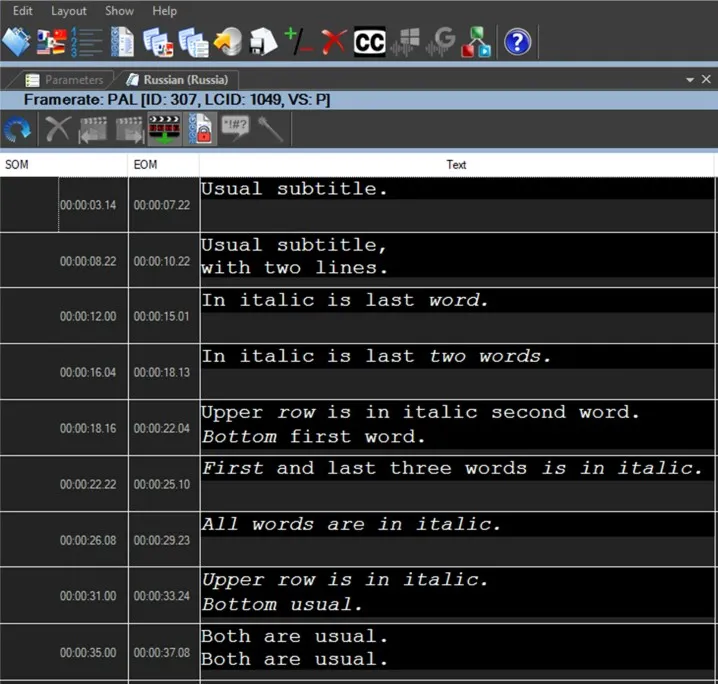
The import of STL files has been implemented with support for style attributes at the single-word level.
The behaviour is aligned with SRT import: subtitles are saved in the database in HTML format.
As a result, imported subtitles are read-only.
The test2.stl file, provided by the customer for testing, is available in doma.
Important note
This change is not backward compatible.
After the update, STL import will exclusively use the new mode.
Legacy import
In case of issues, it is possible to use the previous import procedure by renaming the file extension
from .stl to .v1.stl
Example: test2.stl → test2.v1.stl
This way, the file will be imported using the deprecated mode.
Important note
Verify whether, on the automation side, the ml-cgc template needs to be updated.
In the penultimate subtitle of the file test2.stl, the following text appears:
Upper row is in italic.
Bottom usual.
In this case, the italic tag is opened at the beginning of the text but never closed.
As a result, the second line is also displayed in italic. This is likely an oversight in the STL file.
----------------------------------------------------------------------------------------
Additionaly the ml-cgc file needs to be modified following the example 777_SRT.ml-cgc found in incident 310491.
With the new import, the STL file is treated as an SRT file; therefore, the ml-cgc file must be adjusted accordingly.
To verify whether the file is correct, check that it contains the <content-item> node