4.1.3 User functions
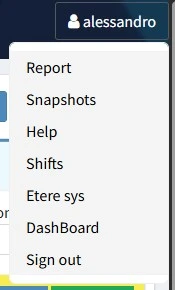
In this chapter we're going to see which functions are available in the user menu, at the top-right corner of any page of the support web site.
user_functions
• Report: Displays the report of the day, with all the solutions managed by the user and the related time. At the bottom of the form, the field "626 annotations" allows to write any note or any anomaly found during the safety check support members do on afternoon shifts. Click the GO TO REPORT PAGE button to open the report in a new browser tab. Click the SEND EMAIL button at the end of the shift to send the report by email to DailyReport and Turni groups.
Notes:
- "626" refers to the legislative decree n.626, which contains italian laws about health and safety in workplaces.
- The solutions with zero jts are not counted in the report and they are not displayed.
• Snapshots: Every time customers launch the Save logs function from Etere, some of the data in their database is exported and imported into support database. This data include: Etere PCs and their properties, features installed, version of the Etere files and so on. Support can display the data taken from the customer's db in the customer area, in the tab Etere Installation (see chapter 3.1.5.0 Customer area). A snapshot is saved every time these data are imported into Support database, creating a sort of saving point for each specific customer area.
This button in the user menu allows to see a list of all the customer codes' snapshots or the ones for a specific customer code. Clicking on a customer code is also possible to access directly to the customer area.
• Help: Shows a legend of the icons used in support.
• Shifts: Shows the shifts table (only for support team from Italy).
• Etere sys: Opens the login page of sys.etere.com web site.
• Dashboard: Displays a summary of all the incidents by status, the conected users and some system information.
• Sign out: After a confirmation message, it logs you out from su.etere.com. In case there is any solution with zero jts, a message asks whether to log out anyway or not.