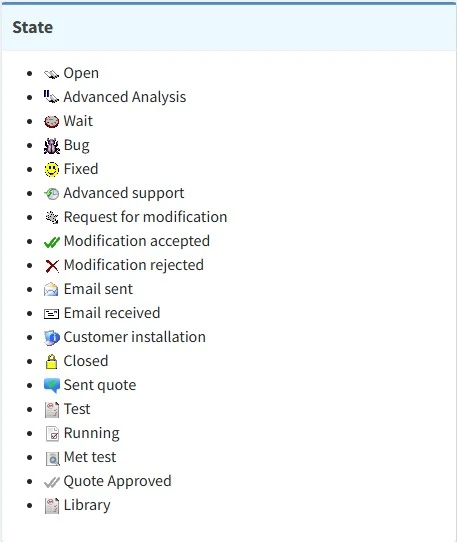
4.1.7 Incident states
This is a list of all the possible states that can be assigned to the ticket solutions, their meaning and how to use them.
support_states
OPEN - The ticket has been taken / A colleague who ended his shift left something to do / A developer replied to support team questions
How to use: If no one in support took the ticket already and if everything else has a lower priority, you should take the ticket saving a new solution with this state and start managing it.
ADVANCED ANALYSIS - The ticket is forwarded to someone else (a developer, another support technician, Fabio, Laura...) with questions about the issue or because he's the one in charge for the job.
How to use: Usually the ticket is left as it is until the person who it's been assigned to replies or takes the ticket. If someone assigned the ticket to you, keep in mind that no one will manage that ticket but you. You should manage it according to priority. You can use this state to assign a ticket to yourself, when a job you're carrying out is not done yet.
WAIT - Support is waiting a reply from a customer
How to use: Use it every time you're asking something to the customer (something to do or to send us). Usually tickets in wait status are left in that status until the customer replies.
BUG - A problem with an Etere feature has been found
How to use: Use it to forward the ticket to a developer when you are absolutely sure that Etere's behavious is wrong (even in real situations) and that it depends on how the software itself is made (not on wrong configurations or misuse).
FIXED - An issue has been solved by the developer / A modification (requested by the customer or by any of us) has been made
How to use: Devs leave tickets in this status when they modify an Etere file. The modification have to be tested in our systems (when it's possible) then proceed as described in the chapter 3.4.0.0 How to test a fix. Sometimes support sets back a ticket in the fixed status when it's not possible to test it or to test it completely yet.
ADVANCED SUPPORT - The problem has been submitted (by Alex or Fabio) to Medialooks
How to use: It's a state used by Alex or Fabio to indicate that the problem is in charge to Medialooks. Before that, support and developers team analyze the problem to understand if a solution is possible. If the issue is related to Medialooks functions Etere just use, and support has been able to reproduce it with Medialooks tools, Fabio or Alex submits the problem to Medialooks helpdesk.
REQUEST FOR MODIFICATION - The customer requests a feature or function not present in Etere / A support technician suggest an improvement for Etere
How to use: When a customer asks for a specific function or feature and support team has verified that it's not available in Etere, the customer can submit a modification request to marketing@etere.com. It will be evaluated by Fabio or Alex and forwarded to the developer if approved. The ticket can be put in modification request status also by support team, after they checked the feature requested is not available. Devs or support team can forward the ticket to Fabio or Alex in modification request status to suggest a way to improve the software.
MODIFICATION ACCEPTED - The modification request has been approved
How to use: This state is used by Fabio when he approves a modification request. He also assigns the ticket to a specific developer who will make the modification and sets a priority.
MODIFICATION REJECTED - The modification request has been denied
How to use: This state is used by Fabio when he doens't approve a modification request. Nothing to do.
EMAIL RECEIVED - Support team has received an email and it's been catalogued in a new or in an existing ticket
How to use: This state is automatically set when an email is catalogued into support. Not used manually.
CUSTOMER INSTALLATION - Used for a set of tickets created specifically as a checklist of everything support has to do when the first configuration on a customer's system is being carried out.
How to use: Not used by support team.
CLOSED - An issue has been solved (by Etere or by the customer) / A job has been completed / No support / Automatic closure
How to use: Use it when the customer confirms the issue is solved or when a job is done and support doesn't need to receive a feedback from the customer. Use it also when the customer is in pink (outstanding payments) or red status (support contract expired) and alert him sending a proper communication. A ticket can be also closed automatically, if it's in wait and support team doesn't receive any reply for more than 25 days.
SENT QUOTE - Fabio has sent a quotation to the customer, regarding a requested feature that is not included in the support fee.
How to use: Not used by support team.
TEST - One or more tests are in progress
How to use: Set it to indicate that a test is being performed. It could be a test for a specific issue or a personal test, to understand better a specific feature.
RUNNING - The ticket is being managed
How to use: Set this state when you are carrying out a job and it's not done yet. Developers use this state for this same purpose and also when they are analyzing the issue submitted by support team. This State is very important because it is used to calcolate the time spent on a solution. Programmers must also keep this value up to date by clicking the "Apply" button upon completing a task, so that the time spent developing a module or function, or fixing a bug, can be tracked.
MET TEST - Tickets used to test the met.
How to use: Used by Maurizio when he creates a new met. See chapter 3.6.0.0 Met tests for more information about it.
QUOTE APPROVED - The customer approved the quote sent by Fabio.
How to use: Only used by Fabio.